
This tutorial is part of a series that is designed to provide a quick study guide in cryptography for a product development engineer. Each segment takes an engineering rather than theoretical approach on the topic. In this installment, you’ll learn the difference between hardware and software implementations of cryptographic solutions and get insights on some common applications. A similar version of this tutorial originally appeared on May 27, 2020 on Electronic Design.
Modern cryptographic algorithms can be implemented using dedicated cryptographic hardware or software running on general-purpose hardware. For various reasons, dedicated cryptographic hardware provides a better solution for most applications. Table 1 shows a list of reasons hardware-based cryptographic solutions are more desirable.
Table 1. Hardware vs. Software Cryptography Comparison
| Hardware-Based Cryptography | Software-Based Cryptography |
|---|---|
| 1. Uses dedicated hardware thus much faster to execute. | 1. Uses shared hardware thus slower to execute. |
| 2. Not dependent on the operating system. Supported by dedicated software for operating the hardware. | 2. Dependent on the security levels and features of the operating system and supported software. |
| 3. Can use factory provisioning and securely store keys and other data in dedicated secure memory locations. | 3. No dedicated secure memory locations available. Thus, susceptible to stealing or manipulation of keys and data. |
| 4. Maxim’s hardware implementations have protections built in against reverse engineering such as PUF (ChipDNA). | 4. Software implementations can be easier to reverse engineer. |
| 5. In a hardware system, special care is taken to hide and protect the vital information such as private keys to make it much more difficult to access. | 5. In a general-purpose system where software cryptography is implemented, there are more ways to snoop and access to vital information. An example would be intercepting the private key in transit within the computer’s system. |
IoT devices based on embedded hardware are woven into our everyday lives:
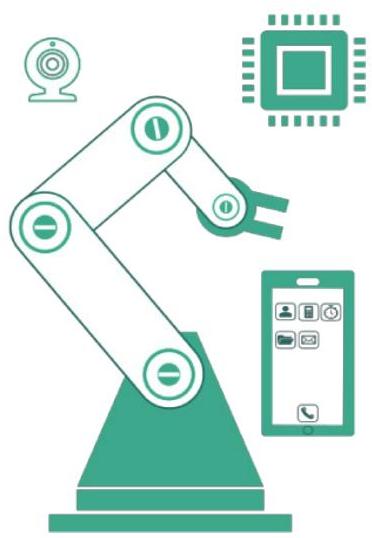
Almost all these devices (see Figure 1) contain boot firmware or downloadable data that access the internet, so they can be vulnerable to security threats. Boot firmware — the brains of the device — is essentially saved in nonvolatile memory inside the device.
Figure 1. IoT devices such as a robotic arm in a factory have embedded hardware that could pose a security risk.
This software is updated periodically to correct and enhance certain features, from adding a new intruder detection algorithm for a WiFi camera or enabling better positioning of a weld from the angle of an industrial robotic arm.
In this tutorial, we will cover all the necessary steps needed to securely boot as well as upload new firmware in a connected device.
Because IoT devices must be trustworthy, the device firmware and critical data must be verified to be genuine. In a perfect world, boot firmware and configuration data would be locked down at the factory. In reality, customers have come to expect firmware updates and reconfiguration to be available over the internet. Unfortunately, this creates an opening for malicious actors to use these network interfaces as a conduit for malware. If someone gains control of an IoT device, they may take control of the device for malicious purposes. For this reason, any code that purports to come from an authorized source must be authenticated before it’s allowed to be used.
An attacker may deliver malware to an IoT device by various means (Figure 2):
Secure boot and secure download can help prevent infiltration and protect against malware injection. This means the IoT device can trust the updates being received from the command/control center. If a command/control center wants to fully trust the IoT device, an additional step of authenticating the IoT device’s data needs to occur.
Authentication and integrity can provide a way to:
With authentication and integrity, the firmware and configuration data are loaded during the manufacturing phase and all subsequent updates are digitally signed.

Figure 2. Attackers can infiltrate an unprotected IoT device vs. a secured IoT device.
This way, the digital signature enables trust during the device’s entire lifetime. The following features of digital signature are paramount to providing security.
For our secure solution, we’ll examine asymmetric cryptographic algorithms, specifically, the FIBS 186 ECDSA.
Asymmetric cryptography uses a public/private key pair for algorithm computations (Figure 3).
The fundamental principles of secure download in asymmetric cryptography are:
What are the advantages of asymmetric key cryptography?
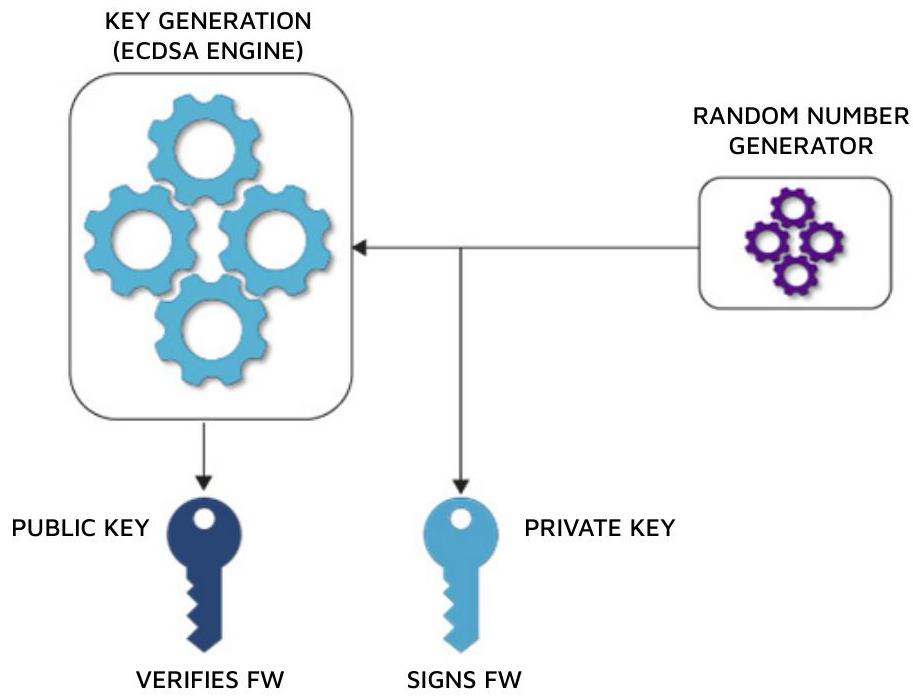
Figure 3. Asymmetric cryptography includes ECDSA key generation.
Let’s now look at an example of what must occur at an R&D facility that utilizes asymmetric key cryptography.
Figure 4 illustrates these points in greater detail.
Now let’s examine what occurs during field usage.
For embedded devices that do not have a secure microcontroller with the computational capacity to perform the required calculations to verify the authenticity and integrity of downloaded firmware or data, DS28C36 DeepCover secure authenticator is a cost-effective hardware-based IC solution (Figure 5).

Figure 4. Asymmetric cryptography digitally signs a set of data or firmware.
Steps for secure boot and secure download:
In summary, we have shown a proven security solution for secure boot or secure download using the DS28C36 that addresses threats to IoT devices. This secure authenticator IC offloads the heavy computational math involved to prove both authenticity and integrity of firmware or data updates.

Figure 5. Secure boot and secure download in a cost-effective, hardware-based solution using the DS28C36.
For more information about Maxim’s secure boot and secure download solutions and services, please see the following:
Go to the Security Lab tool to execute this sequence example or using Maxim’s other additional hardware labs.
Bidirectional (or mutual) authentication is an important part of secure communication. Both parties of communication should be certain that their counterpart can be trusted. This can be accomplished by proving possession of private information. This information can be shared between the parties, or kept completely private, as long as the ability exists to prove possession.
Symmetric authentication systems require information to be shared among all participants in a given communication. This information is usually called a „secret.“ A secret is a piece of information known only to those who need it. The secret is used in concert with a symmetric authentication algorithm such as SHA, along with other data shared between participants. The ability to generate a matching signature on both sides of communication proves possession of the secret.
Asymmetric authentication systems (like ECDSA) employ hidden information that is not shared between parties (known as a ‚private key‘) but is used to produce information that can be known to the public (known as a ‚public key‘). Proper use of the public key proves possession of the private key because the private key is needed to unlock a message locked by the public key and vice versa.
To authenticate a recipient device in a sender-recipient configuration, a piece of random data (also known as a „challenge“) is sent to a recipient. Along with any shared data between the devices, the challenge is run through a signing operation with a secret or private key to produce a „response“ signature.

Figure 6. Recipient device authentication in a sender-recipient system.
The response signature can be verified by the sender because the sender is in possession of the shared secret, or a public key that corresponds to the recipient’s private key. The general flow of this process is shown in Figure 6.
Authentication generally depends upon algorithms that produce signatures that prove possession of a participant’s hidden information but make it difficult to discover the information itself. These are known as 1-way functions. SHA and ECDSA are examples of such algorithms.
In order to prove all parties can be trusted, the sender must also need to prove authenticity to the recipient. An example of this process is shown below in the form of an authenticated write.
In Figure 7, the sender is writing new data into a recipient device. However, to complete the write, the recipient must verify authenticity of the information by requiring the sender to produce a signature based on that information as well as the sender’s hidden data (secret or private key). By using either a shared secret or the public key corresponding to the sender’s private key, the recipient can verify that the signature is authentic.
The use of 1-way functions may allow any eavesdroppers to see all data being transmitted, but it prevents them from determining the hidden information that produced the signatures associated with the data. Without this hidden information, eavesdroppers cannot become impersonators.
This two-way authentication model can easily be used to make sure that intellectual property stored in a device will be well-protected from counterfeiters.

Figure 7. A sender writes new data into a recipient device.
Maxim’s ChipDNA secure authenticators have a built-in TRNG (Figure 8). This is used by the device for internal purposes. But they also have a command that sends out the TRNG output if the user requests it. At this time, the maximum length of the TRNG output length is 64 bytes. This hardware NIST-compliant random number source can be used for cryptographic needs such as „challenge (nonce)“ generation by a host processor.
There are three different specifications related to TRNGs

Figure 8. ChipDNA secure authenticator includes a built-in true random number generator.
Zia Sardar: Zia is an Applications Engineer at Maxim Integrated. Prior to joining Maxim, Zia worked at Advanced Micro Devices and ATI Technologies, focusing on graphics processors and PCIe bridge products. He holds an M.S. degree in computer engineering and a B.S. degree in electrical engineering from Northeastern University in Boston, Massachusetts.
Stewart Merkel: Stewart has been an Applications Engineer at Maxim Integrated for over 10 years. Prior to joining Maxim, Stewart worked at Odin Telesystems and Raytheon, concentrating on secure and non-secure telecommunications equipment. He holds a B.S. degree in electrical engineering from Binghamton University in New York.
Aaron Arellano: Aaron has worked as an Applications Engineer at Maxim Integrated for over five years. Prior to joining Maxim, Aaron served in different roles in information technology, network administration, computer hardware, and SSL (secure single sign-on) over a 15-year span. He holds a B.S. in electrical engineering from DeVry University.